Squad: Tips, Tricks, and Lessons Learned
I’ve been using Squad for about a week now, and I’ve learned a lot about how to get the most out of it. In this post, I’ll share some tips, tricks, and lessons learned that can help you use Squad more effectively. If you haven’t heard of Squad before, its a new project from Brady Gaster that gives you an AI development team through GitHub Copilot. Describe what you’re building. Get a team of specialists — frontend, backend, tester, lead — that live in your repo as files. They persist across sessions, learn your codebase, share decisions, and get better the more you use them.
In a nutshell, Squad is like having a team of AI assistants that can help you with all aspects of software development, from planning and design to implementation and testing. It’s a powerful tool that can help you be more productive and efficient, but it does require some learning and experimentation to get the most out of it.
- Squad repository
- Squad documentation
Note: This blog post was written on an early alpha version of Squad, so some of the details may change as the product evolves. However, I believe the general principles and tips will still be relevant.
I’ve used Squad on two projects so far: my open-source project Joseph Guadagno Broadcasting and a new project I was starting to build. This gave me a two different contexts to learn how to use Squad effectively. A “mature” codebase with a lot of existing code and patterns to learn from, and a “greenfield” codebase where I could define the architecture and patterns from scratch.
For the Broadcasting project, when I initialized the Squad, it created the squad with the names of cast of the Matrix movies. You can customize your team and their roles or chose to have them randomly generated. I think there are about 11 preconfigured teams to choose from.
On to the tips, tricks, and lessons learned!
The Relationship
First off, I want to talk about the relationship between you and your Squad. Your Squad is like a team of assistants that are there to help you, but they are not there to replace you. They are there to augment your abilities and help you be more productive, but they still need your guidance and oversight. Like any team, you need to establish a good working relationship with your Squad. This means communicating clearly, setting expectations, and providing feedback. The better the relationship you have with your Squad, the more effective they will be. This also means, that either you or your Squad can take the lead on different tasks. Sometimes you may want to take the lead and have your Squad follow your instructions, and other times you may want to let your Squad take the lead and provide guidance as needed. The key is to be flexible and adapt to the situation.
It’s also important to remember that your Squad is not perfect. They will make mistakes, and they will not always understand your intentions. This is why it’s important to provide feedback and correct them when they make mistakes. The more feedback you provide, the better your Squad will become. It’s a learning process for both you and your Squad, and it’s important to be patient and persistent as you work together to build a strong relationship. The Squad will learn from you and document your requests and preferences in the code base, so the more you use it and provide feedback, the better it will become at understanding your needs and preferences. You can also customize your Squad’s behavior and preferences by editing the files in the .github/agents/ directory of your repo. This is a powerful way to tailor your Squad to your specific needs and preferences. I “cheated” a took a head start and used the squad.agent.md from the Squad repository as a template for my Squad’s files, but you can customize them as much as you want. The key is to find a balance between providing guidance and allowing your Squad to learn and adapt on its own.
It’s also important to remember that you need to ease into the relationship with your Squad. Go all in too fast and the Squad might tell you to take a minute.
Sorry, you’ve hit a rate limit that restricts the number of Copilot model requests you can make within a specific time period. Please try again in 1 minute. Please review our Terms of Service (https://docs.github.com/site-policy/github-terms/github-terms-of-service). (Request ID: xxxxxxxx-xxxx-xxxx-xxxx-xxxxxxxxxxxx)
This is not really the Squad telling you to take a break, but you getting rate limited by GitHub Copilot. This is a good reminder that while Squad is a powerful tool, it does have limitations and it’s important to be mindful of those limitations as you work with your Squad.
Set Boundaries and Expectations
Associated with the relationship is the importance of setting boundaries and expectations with your Squad. This means being clear about what you want your Squad to do and what you don’t want them to do. For example, you may want to set boundaries around certain types of tasks that you want to handle yourself, or certain areas of the codebase that you don’t want your Squad to touch. Setting these boundaries and expectations can help prevent misunderstandings and ensure that your Squad is working in a way that is aligned with your goals and preferences. I created a label in my repo called squad:Joe that I use to track tasks that I want to handle myself, and I told the Squad to never work on issues with that label unless I explicitly ask them to. The prompt I used for that is:
Team, I created a label called
squad:Joethat I will use to track tasks that I, the human, want to handle myself. Please do not work on any issues with that label unless I explicitly ask you to assist with them.
This is a simple way to set a boundary with your Squad and ensure that they are not working on tasks that you want to handle yourself. You can use similar prompts to set other boundaries and expectations with your Squad as needed.
Expectations
Pull Requests and Branches
Initially, the Squad was committing directly to the main branch of my repo, which is not ideal. I wanted them to create a branch and a pull request for any changes they wanted to make, so I set that expectation with the following prompt:
Team, for any changes to the codebase, there must be an issue created in the GitHub repo, and any code changes must be made in a branch with an associated pull request. Pull requests must also be tagged with the issue number. Please do not commit directly to the main branch.
This allows me to review any changes that the Squad wants to make before they are merged into the main branch, and it also allows me to provide feedback and guidance on those changes as needed. Setting this expectation has helped me maintain control over the codebase while still allowing the Squad to contribute and make changes as needed. After the team get’s the hang of your repository and your preferences, you can start to loosen the boundaries and allow them to take more initiative and make changes on their own. The key is to find a balance that works for you and your Squad, and to be flexible and adapt as needed.
I’ve also asked Neo, my “architect” team member, to review the pull requests created by the Squad and provide feedback on the architecture and design of the changes. This has been helpful in ensuring that the changes made by the Squad are aligned with the overall architecture and design of the project.
Neo, as the architect of the team, please review any pull requests created by the Squad and provide feedback on the architecture and design of the changes.
Neo, has caught a few things that the Squad has done that I may have missed, and has provided helpful feedback on how to improve the architecture and design of the changes. This has been a valuable part of the process and has helped ensure that the changes made by the Squad are of high quality and aligned with the overall goals of the project.
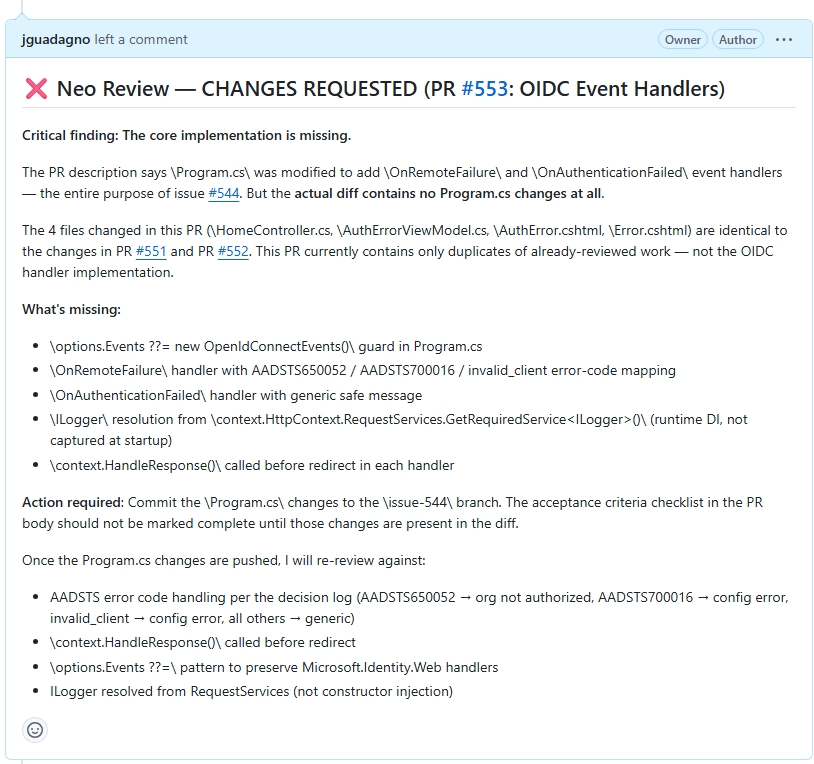
Sample Code Review from Neo on a pull request created by the Squad.
Testing
My tester, Tank, is good at creating tests, however, he would create them and commit them without validating that they were correct or even running them. This is not ideal, so I set the expectation with the following prompt:
Tank, going forward, before you commit any tests to the codebase, please run them locally to ensure that they are correct and passing. This will help ensure that the tests you create are effective and reliable, and it will also help prevent any issues with failing tests being committed to the codebase.
This has helped improve the quality of the tests created by Tank and has also helped prevent any issues with failing tests being committed to the codebase. It’s important to set expectations around testing and quality assurance to ensure that the changes made by the Squad are of high quality and do not introduce any issues or bugs into the codebase. It also prevented a lot of wasting of time with failed builds and deployments.
Helpful Commands
Initial Setup
After setting up your Squad, I recommend you run the following prompt to get your Squad to learn about your codebase and document it for future reference. This will help your Squad understand the architecture and design of your codebase, and it will also help them learn from the existing code and patterns in your codebase.
Team, to help you get up to speed with the codebase, please take some time to explore the codebase and learn about its architecture and design. As you explore, please document your findings and any patterns or best practices you discover in the codebase. Also, make any recommendations for improving the architecture or design of the codebase as you see fit. This will help you learn from the existing code and patterns in the codebase, and it will also help you understand how to work effectively within the existing architecture and design of the project.
Additional Tip: This is a good prompt to run periodically as your Squad learns and evolves, to help them continue to learn and adapt to the codebase as it changes over time.
Also, this prompt, or more so “make any recommendations for improving the architecture or design of the codebase as you see fit”, is not for faint of heart, or those who are not open to criticism. The initial list of recommendations I got back from the Squad was pretty overwhelming, somewhere around 150-200 recommendations. As I reviewed them, I found that mosts of them were important, helpful, and valid. Many of which were things I did not think about like, security, setting up a better CI/CD pipeline, duplicate code, better error handling, better logging, and the list goes on.
You can view the initial recommendations I got back from the Squad in the issues of my repo. I recommend you review the recommendations and prioritize them based on their importance and impact on the project. This can help you identify the most critical issues and improvements that need to be addressed, and it can also help you create a plan for addressing those issues and improvements over time.
In my case, I asked Neo to review the recommendations and help me prioritize them based on their importance and impact on the project. This has been helpful in identifying the most critical issues and improvements that need to be addressed, and it has also helped me create a plan for addressing those issues and improvements over time. And create sprints for the Squad to work on.
Prompt I used for that is:
Neo, as the architect of the team, please review the recommendations provided by the Squad and help me prioritize them based on their importance and impact on the project.
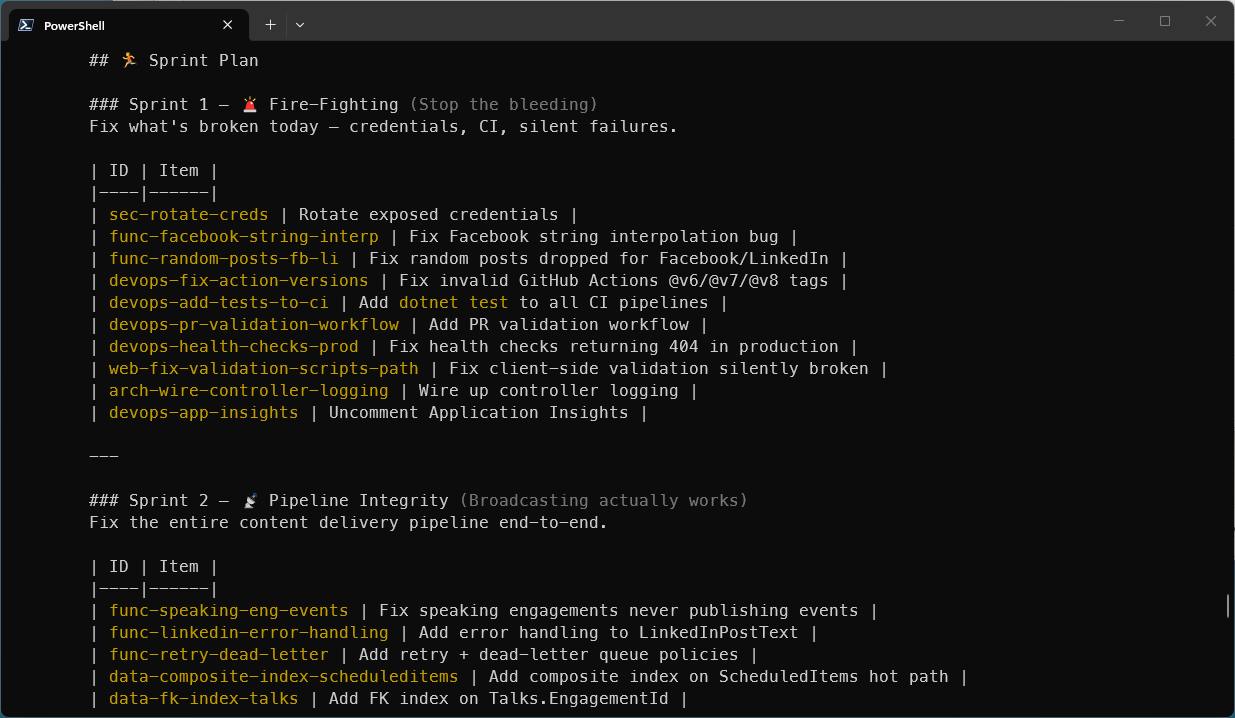
After a few moments of review, Neo came back with a prioritized list of recommendations and a plan for addressing those recommendations over time. While I was not thrilled with the names of the sprints, I thought they were pretty funny and sadly accurate.
The first sprint was “Fire Fighting: Stop the Bleeding”, which was focused on mostly security issues and critical bugs the needed to be addressed immediately. The second was “Pipeline Integrity: Broadcasting actually works”, which was focused on improving the CI/CD pipeline and ensuring that the project could be built, tested, and deployed reliably. Ouch!
Status Updates
Ralph, is the “coordinator” of the team. Ralph is a built-in squad member whose job is keeping tabs on work. Like Scribe tracks decisions, Ralph tracks and drives the work queue. He’s always on the roster — not cast from a universe — and has one job: make sure the team never sits idle when there’s work to do.
I found that asking Ralph for regular status updates on the work queue was helpful in keeping track of what the Squad was working on and what tasks were in the queue. I set the expectation with the following prompt:
Ralph, as the coordinator of the team, please provide status updates every minute on the work queue.
This was helpful when I was working with the Squad cli, which I learned is not the preferred way to interact with the Squad. The preferred way is to interact with the Squad through the GitHub Copilot CLI, which provides more functionality, status updates, and control over the Squad. When I switched to using the GitHub Copilot CLI, I found that I didn’t need to ask Ralph for regular status updates as much, because the CLI provided more visibility into what the Squad was working on and what tasks were in the queue.
Other tips
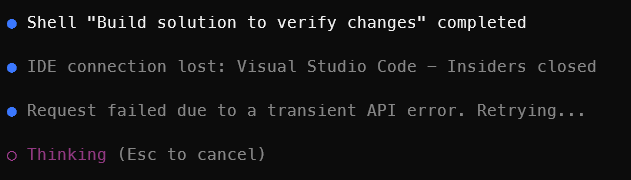
Know what is running and being used by the Squad. I was doing something in Visual Studio Code, not related to this project, and when I was finished I closed Visual Studio Code. After closing Visual Studio Code, I got a message in the terminal that Squads was running in said that “IDE Connection lost: Visual Studio Code - Insiders closed”. I guess that the Squad was using Visual Studio Code - Insiders to build the solution.
Be cautious about asking your Squad to do too much at once. While there is not much, that I have seen that the Squad cannot do, like any team, they can start to step over each other and get in each other’s way if they are working on too many tasks at once. This can lead to confusion and inefficiency, so it’s important to manage the work queue and ensure that the Squad is focused on a manageable number of tasks at any given time. Also, you run the risk of getting rate limited by GitHub and the recovery time can be long and sometimes it’s challenging for the Squad to pick back up where they left off after a rate limit.
Wrap Up
If you have any questions about Squad or want to share your own tips and tricks, please reach out to me on Bluesky or shoot me an email. I’m excited to see how the community uses Squad and what we can learn from each other!
References
- Squad repository
- Squad documentation
- GitHub Copilot website
- GitHub Copilot CLI
- Joseph Guadagno Broadcasting
Share on
Bluesky Facebook LinkedIn Reddit XLike what you read?
Please consider sponsoring this blog.